[Android] P-Connect Social

https://github.com/quochung-cyou/P-Connect

Author

  • quochungcyou

Description

  • P-Connect is an Android app written in Java, developed by quochungcyou, made during ProGApp competition in one month. It provides a comprehensive experience with its user-friendly UI/UX, smooth animations, and top performance. With fast loading times and an elegant design, P-Connect offers a plethora of features such as the latest headlines, chat functions, and even a small dating app. Additionally, the code is clean and organized with an MVC structure to ensure maximum efficiency.

Prerequisites

  • To run this software, you need an editor with java support, java – version 11 or higher,android-studio
  • Install java 11 using the commands: sudo apt update sudo apt install openjdk-11-jre-headless
  • Install android-studio sudo snap install android-studio --classic

Setup

  • Clone the project
  • Open in android-studio

Technologies Used

  • Java (version 11)
  • Android
  • Gradle (7.1)

Demo image

1 - quochung.cyou PTIT
2 - quochung.cyou PTIT
3 - quochung.cyou PTIT
4 - quochung.cyou PTIT
5 - quochung.cyou PTIT
6 - quochung.cyou PTIT
7 - quochung.cyou PTIT

License Information

  • This software is licensed under MIT License.
  • Read More on the license.
MIT License

Copyright (c) 2023 QuocHung

Permission is hereby granted, free of charge, to any person obtaining a copy
of this software and associated documentation files (the "Software"), to deal
in the Software without restriction, including without limitation the rights
to use, copy, modify, merge, publish, distribute, sublicense, and/or sell
copies of the Software, and to permit persons to whom the Software is
furnished to do so, subject to the following conditions:

The above copyright notice and this permission notice shall be included in all
copies or substantial portions of the Software.

THE SOFTWARE IS PROVIDED "AS IS", WITHOUT WARRANTY OF ANY KIND, EXPRESS OR
IMPLIED, INCLUDING BUT NOT LIMITED TO THE WARRANTIES OF MERCHANTABILITY,
FITNESS FOR A PARTICULAR PURPOSE AND NONINFRINGEMENT. IN NO EVENT SHALL THE
AUTHORS OR COPYRIGHT HOLDERS BE LIABLE FOR ANY CLAIM, DAMAGES OR OTHER
LIABILITY, WHETHER IN AN ACTION OF CONTRACT, TORT OR OTHERWISE, ARISING FROM,
OUT OF OR IN CONNECTION WITH THE SOFTWARE OR THE USE OR OTHER DEALINGS IN THE
SOFTWARE.

Khắc phục lỗi Encryption unsuccessful của Android Emulator trong Android Studio

Screenshot 2023 03 13 233119 - quochung.cyou PTIT

Đây là một lỗi xảy ra khi phân vùng /data của Android không thể được giải mã bởi hệ thống khiến dữ liệu không truy cập được.

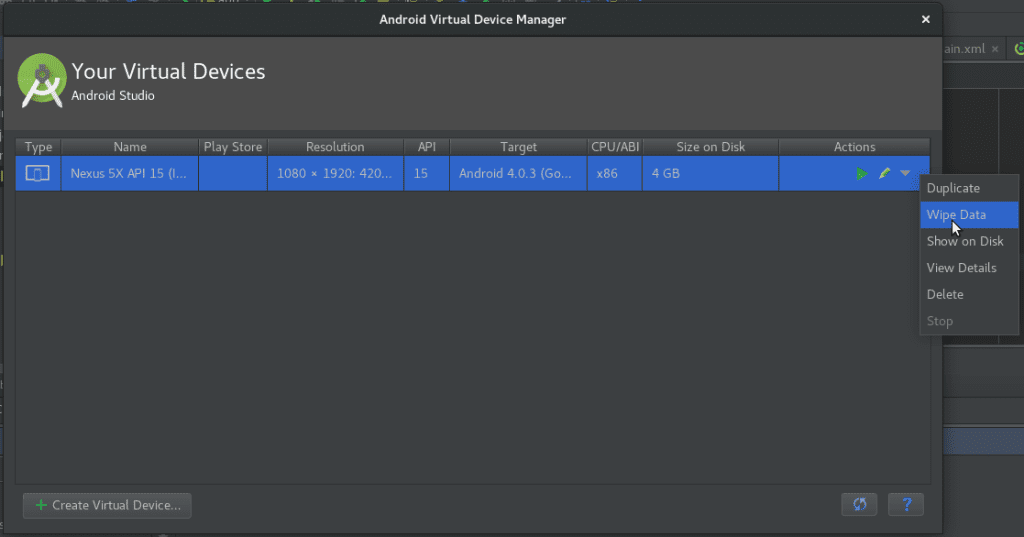
Cách 1: Xoá dữ liệu hệ thống của máy

  • Truy cập vào Tools -> Android -> AVD Manager -> Actions (triangle down) -> Wipe Data
  • Cách này sẽ xoá toàn bộ dữ liệu gốc của máy, nên các dữ liệu được mã hoá sẽ bị xoá hết và việc truy cập máy sẽ hoàn toàn mới và bình thường
image 8 - quochung.cyou PTIT

Cách 2: Cold Boot

Một số trình Android Studio mới hỗ trợ Quick Boot – Một cách bật máy ảo nhanh và chạy lại tiến trình trước đó nhanh chóng giúp quá trình lập trình ứng dụng diễn ra nhanh hơn. Cold Boot là một cách bật máy từ ban đầu và có thể khắc phục một số lỗi như trên

  • Khởi chạy Cold Boot chay: AVD Manager -> Select device -> Cooled Boot Now
  • Đặt mặc định Cold Boot: AVD Manager -> Select device -> Edit -> Advanced -> Boot option: Cool Boot

[Android] Sudungthuoc

https://github.com/quochung-cyou/Sudungthuoc

Author

  • quochungvn

Description

A webapp for medicine/drug and health tips

Prerequisites

  • To run this software, you need an editor with java support, java – version 11 or higher,android-studio
  • Install java 11 using the commands: sudo apt update sudo apt install openjdk-11-jre-headless
  • Install android-studio sudo snap install android-studio --classic

Setup

  • Clone the project
  • Open in android-studio

Technologies Used

  • Java (version 11)
  • Android
  • Gradle (7.1)
  • Firebase Realtime Storage, Firebase Auth

Demo image

Demo
Demo

License Information

  • This software is licensed under MIT License.
  • Read More on the license.
MIT License

Copyright (c) 2021 QuocHung

Permission is hereby granted, free of charge, to any person obtaining a copy
of this software and associated documentation files (the "Software"), to deal
in the Software without restriction, including without limitation the rights
to use, copy, modify, merge, publish, distribute, sublicense, and/or sell
copies of the Software, and to permit persons to whom the Software is
furnished to do so, subject to the following conditions:

The above copyright notice and this permission notice shall be included in all
copies or substantial portions of the Software.

THE SOFTWARE IS PROVIDED "AS IS", WITHOUT WARRANTY OF ANY KIND, EXPRESS OR
IMPLIED, INCLUDING BUT NOT LIMITED TO THE WARRANTIES OF MERCHANTABILITY,
FITNESS FOR A PARTICULAR PURPOSE AND NONINFRINGEMENT. IN NO EVENT SHALL THE
AUTHORS OR COPYRIGHT HOLDERS BE LIABLE FOR ANY CLAIM, DAMAGES OR OTHER
LIABILITY, WHETHER IN AN ACTION OF CONTRACT, TORT OR OTHERWISE, ARISING FROM,
OUT OF OR IN CONNECTION WITH THE SOFTWARE OR THE USE OR OTHER DEALINGS IN THE
SOFTWARE.

[Android] SimpleWeather

https://github.com/quochung-cyou/SimpleWeather

Author

  • quochungvn

Description

  • A android plant shop app with firebase backend

Prerequisites

  • To run this software, you need an editor with java support, java – version 11 or higher,android-studio
  • Install java 11 using the commands: sudo apt update sudo apt install openjdk-11-jre-headless
  • Install android-studio sudo snap install android-studio --classic

Setup

  • Clone the project
  • Open in android-studio

Technologies Used

  • Java (version 11)
  • Android
  • Gradle (7.1)
  • Firebase Realtime Storage, Firebase Auth

Demo image

Image

License Information

  • This software is licensed under MIT License.
  • Read More on the license.
MIT License

Copyright (c) 2021 QuocHung

Permission is hereby granted, free of charge, to any person obtaining a copy
of this software and associated documentation files (the "Software"), to deal
in the Software without restriction, including without limitation the rights
to use, copy, modify, merge, publish, distribute, sublicense, and/or sell
copies of the Software, and to permit persons to whom the Software is
furnished to do so, subject to the following conditions:

The above copyright notice and this permission notice shall be included in all
copies or substantial portions of the Software.

THE SOFTWARE IS PROVIDED "AS IS", WITHOUT WARRANTY OF ANY KIND, EXPRESS OR
IMPLIED, INCLUDING BUT NOT LIMITED TO THE WARRANTIES OF MERCHANTABILITY,
FITNESS FOR A PARTICULAR PURPOSE AND NONINFRINGEMENT. IN NO EVENT SHALL THE
AUTHORS OR COPYRIGHT HOLDERS BE LIABLE FOR ANY CLAIM, DAMAGES OR OTHER
LIABILITY, WHETHER IN AN ACTION OF CONTRACT, TORT OR OTHERWISE, ARISING FROM,
OUT OF OR IN CONNECTION WITH THE SOFTWARE OR THE USE OR OTHER DEALINGS IN THE
SOFTWARE.

[Android] Sleep Tracker

https://github.com/quochung-cyou/SleepTracker

Author

  • quochungcyou

Description

  • A nice, minimal android sleep tracker app with modern UI

Prerequisites

  • To run this software, you need an editor with java support, java – version 11 or higher,android-studio
  • Install java 11 using the commands: sudo apt update sudo apt install openjdk-11-jre-headless
  • Install android-studio sudo snap install android-studio --classic

Setup

  • Clone the project
  • Open in android-studio

Technologies Used

  • Java (version 11)
  • Android
  • Gradle (7.1)
  • ProgressWheel
  • SharedPreferences

Demo image

mockup - quochung.cyou PTIT
gifdemo - quochung.cyou PTIT

License Information

  • This software is licensed under MIT License.
  • Read More on the license.
MIT License

Copyright (c) 2021 QuocHung

Permission is hereby granted, free of charge, to any person obtaining a copy
of this software and associated documentation files (the "Software"), to deal
in the Software without restriction, including without limitation the rights
to use, copy, modify, merge, publish, distribute, sublicense, and/or sell
copies of the Software, and to permit persons to whom the Software is
furnished to do so, subject to the following conditions:

The above copyright notice and this permission notice shall be included in all
copies or substantial portions of the Software.

THE SOFTWARE IS PROVIDED "AS IS", WITHOUT WARRANTY OF ANY KIND, EXPRESS OR
IMPLIED, INCLUDING BUT NOT LIMITED TO THE WARRANTIES OF MERCHANTABILITY,
FITNESS FOR A PARTICULAR PURPOSE AND NONINFRINGEMENT. IN NO EVENT SHALL THE
AUTHORS OR COPYRIGHT HOLDERS BE LIABLE FOR ANY CLAIM, DAMAGES OR OTHER
LIABILITY, WHETHER IN AN ACTION OF CONTRACT, TORT OR OTHERWISE, ARISING FROM,
OUT OF OR IN CONNECTION WITH THE SOFTWARE OR THE USE OR OTHER DEALINGS IN THE
SOFTWARE.

[Android] Calculator

https://github.com/quochung-cyou/Calculator

Author

  • quochungbn

Description

  • A calculator android app with light/dark mode and modern design

Prerequisites

  • To run this software, you need an editor with java support, java – version 11 or higher,android-studio
  • Install java 11 using the commands: sudo apt update sudo apt install openjdk-11-jre-headless
  • Install android-studio sudo snap install android-studio --classic

Setup

  • Clone the project
  • Open in android-studio

Technologies Used

  • Java (version 11)
  • Android
  • Gradle (7.1)
  • SharedPreferences (Dark/Light Mode)

Demo image

Image
Image

License Information

  • This software is licensed under MIT License.
  • Read More on the license.
MIT License

Copyright (c) 2021 QuocHung

Permission is hereby granted, free of charge, to any person obtaining a copy
of this software and associated documentation files (the "Software"), to deal
in the Software without restriction, including without limitation the rights
to use, copy, modify, merge, publish, distribute, sublicense, and/or sell
copies of the Software, and to permit persons to whom the Software is
furnished to do so, subject to the following conditions:

The above copyright notice and this permission notice shall be included in all
copies or substantial portions of the Software.

THE SOFTWARE IS PROVIDED "AS IS", WITHOUT WARRANTY OF ANY KIND, EXPRESS OR
IMPLIED, INCLUDING BUT NOT LIMITED TO THE WARRANTIES OF MERCHANTABILITY,
FITNESS FOR A PARTICULAR PURPOSE AND NONINFRINGEMENT. IN NO EVENT SHALL THE
AUTHORS OR COPYRIGHT HOLDERS BE LIABLE FOR ANY CLAIM, DAMAGES OR OTHER
LIABILITY, WHETHER IN AN ACTION OF CONTRACT, TORT OR OTHERWISE, ARISING FROM,
OUT OF OR IN CONNECTION WITH THE SOFTWARE OR THE USE OR OTHER DEALINGS IN THE
SOFTWARE.

[Android] Covid-19

https://github.com/quochung-cyou/Covid-19

Author

  • quochungcyou

Description

  • Android app update the situation and information about the Covid-19 epidemic

Prerequisites

  • To run this software, you need an editor with java support, java – version 11 or higher,android-studio
  • Install java 11 using the commands: sudo apt update sudo apt install openjdk-11-jre-headless
  • Install android-studio sudo snap install android-studio --classic

Setup

  • Clone the project
  • Open in android-studio

Technologies Used

  • Java (version 11)
  • Android
  • Gradle (7.1)
  • Retrofit
  • NewsAPI

Demo image

alt text
alt text
alt text
alt text

License Information

  • This software is licensed under MIT License.
  • Read More on the license.
MIT License

Copyright (c) 2021 QuocHung

Permission is hereby granted, free of charge, to any person obtaining a copy
of this software and associated documentation files (the "Software"), to deal
in the Software without restriction, including without limitation the rights
to use, copy, modify, merge, publish, distribute, sublicense, and/or sell
copies of the Software, and to permit persons to whom the Software is
furnished to do so, subject to the following conditions:

The above copyright notice and this permission notice shall be included in all
copies or substantial portions of the Software.

THE SOFTWARE IS PROVIDED "AS IS", WITHOUT WARRANTY OF ANY KIND, EXPRESS OR
IMPLIED, INCLUDING BUT NOT LIMITED TO THE WARRANTIES OF MERCHANTABILITY,
FITNESS FOR A PARTICULAR PURPOSE AND NONINFRINGEMENT. IN NO EVENT SHALL THE
AUTHORS OR COPYRIGHT HOLDERS BE LIABLE FOR ANY CLAIM, DAMAGES OR OTHER
LIABILITY, WHETHER IN AN ACTION OF CONTRACT, TORT OR OTHERWISE, ARISING FROM,
OUT OF OR IN CONNECTION WITH THE SOFTWARE OR THE USE OR OTHER DEALINGS IN THE
SOFTWARE.

[Android] Pass Generator

https://github.com/quochung-cyou/PassGenerator

Author

  • quochungcyou

Description

  • A simple pass generator app for android

Prerequisites

  • To run this software, you need an editor with java support, java – version 11 or higher,android-studio
  • Install java 11 using the commands: sudo apt update sudo apt install openjdk-11-jre-headless
  • Install android-studio sudo snap install android-studio --classic

Setup

  • Clone the project
  • Open in android-studio

Technologies Used

  • Java (version 11)
  • Android
  • Gradle (7.1)

Demo image

Image
Image

License Information

  • This software is licensed under MIT License.
  • Read More on the license.
MIT License

Copyright (c) 2021 QuocHung

Permission is hereby granted, free of charge, to any person obtaining a copy
of this software and associated documentation files (the "Software"), to deal
in the Software without restriction, including without limitation the rights
to use, copy, modify, merge, publish, distribute, sublicense, and/or sell
copies of the Software, and to permit persons to whom the Software is
furnished to do so, subject to the following conditions:

The above copyright notice and this permission notice shall be included in all
copies or substantial portions of the Software.

THE SOFTWARE IS PROVIDED "AS IS", WITHOUT WARRANTY OF ANY KIND, EXPRESS OR
IMPLIED, INCLUDING BUT NOT LIMITED TO THE WARRANTIES OF MERCHANTABILITY,
FITNESS FOR A PARTICULAR PURPOSE AND NONINFRINGEMENT. IN NO EVENT SHALL THE
AUTHORS OR COPYRIGHT HOLDERS BE LIABLE FOR ANY CLAIM, DAMAGES OR OTHER
LIABILITY, WHETHER IN AN ACTION OF CONTRACT, TORT OR OTHERWISE, ARISING FROM,
OUT OF OR IN CONNECTION WITH THE SOFTWARE OR THE USE OR OTHER DEALINGS IN THE
SOFTWARE.

[Android] PlantShop

https://github.com/quochung-cyou/PlantShop

Author

  • quochungcyou

Description

  • A android plant shop app with firebase backend

Prerequisites

  • To run this software, you need an editor with java support, java – version 11 or higher,android-studio
  • Install java 11 using the commands: sudo apt update sudo apt install openjdk-11-jre-headless
  • Install android-studio sudo snap install android-studio --classic

Setup

  • Clone the project
  • Open in android-studio

Technologies Used

  • Java (version 11)
  • Android
  • Gradle (7.1)
  • Firebase Realtime Storage, Firebase Auth

Demo image

mockup1 - quochung.cyou PTIT
mockup2 - quochung.cyou PTIT
backend - quochung.cyou PTIT
demogif - quochung.cyou PTIT

License Information

  • This software is licensed under MIT License.
  • Read More on the license.
MIT License

Copyright (c) 2021 QuocHung

Permission is hereby granted, free of charge, to any person obtaining a copy
of this software and associated documentation files (the "Software"), to deal
in the Software without restriction, including without limitation the rights
to use, copy, modify, merge, publish, distribute, sublicense, and/or sell
copies of the Software, and to permit persons to whom the Software is
furnished to do so, subject to the following conditions:

The above copyright notice and this permission notice shall be included in all
copies or substantial portions of the Software.

THE SOFTWARE IS PROVIDED "AS IS", WITHOUT WARRANTY OF ANY KIND, EXPRESS OR
IMPLIED, INCLUDING BUT NOT LIMITED TO THE WARRANTIES OF MERCHANTABILITY,
FITNESS FOR A PARTICULAR PURPOSE AND NONINFRINGEMENT. IN NO EVENT SHALL THE
AUTHORS OR COPYRIGHT HOLDERS BE LIABLE FOR ANY CLAIM, DAMAGES OR OTHER
LIABILITY, WHETHER IN AN ACTION OF CONTRACT, TORT OR OTHERWISE, ARISING FROM,
OUT OF OR IN CONNECTION WITH THE SOFTWARE OR THE USE OR OTHER DEALINGS IN THE
SOFTWARE.